FRUIT ZOMBIE SURVIVAL / FIELD GUIDE
Getting Started in Fruit Zombie Survival — September 2026
Open Fruit Zombie Survival by Vibed Games, learn the controls shown on your screen, and follow the fruit, zombie-wave and Berries upgrade loop. For your first run, focus on understanding the choices in front of you and reading your result before chasing a particular build or reward number.
Main guide sources reviewed: September 11, 2026 (PDT). Auto-Skip example reviewed: September 13, 2026 (UTC). This guide is based on published material, not an in-game test.
- Experience
- Fruit Zombie Survival by Vibed Games; place ID 75290583112878.
- Controls
- Use the bindings or touch controls displayed by your current game.
- Preparation
- This checklist does not assume a specific fruit, character, level or paid pass.
A checklist for your first run
Fruit Zombie Survival combines collecting fruits with fighting zombie waves and bosses. The official description also includes character buildings and Berries upgrades for the current run. These are the systems to recognize first: a fruit, a character building, an upgrade choice and a run result answer different questions. Treat this first attempt as a chance to understand those systems before copying a detailed build from another player.
Start with these five steps
Use the current game screen for menu labels, available choices and control bindings. The steps below are a practical beginner checklist, not a claim that one loadout or sequence is optimal.
Enter the correct experience
Open the Roblox listing for Fruit Zombie Survival by Vibed Games and check place ID 75290583112878. Use that listing to launch the game. Similar names and third-party guide pages are not a substitute for the correct experience.
Identify the controls before a fight
Look at the binding beside each available fruit ability and movement action. Try the displayed control when it is safe to do so. If a written guide names a different key, follow your own screen; this guide does not assume identical desktop, mobile and console controls.
Follow the fruit and wave loop
Collect fruits and face the zombie waves and bosses described in the official listing. Read the choices offered by your current game before selecting one. Begin by learning what your available fruit actions do instead of treating an unsupported tier ranking as a required starting loadout.
Read building and Berries choices
When the game presents character buildings or Berries upgrades, read the displayed effect and cost. Berries are used to strengthen the current run. Check which system the choice affects before spending; do not assume a Berries upgrade is a Diamond reward or a permanent unlock.
Review the result before another attempt
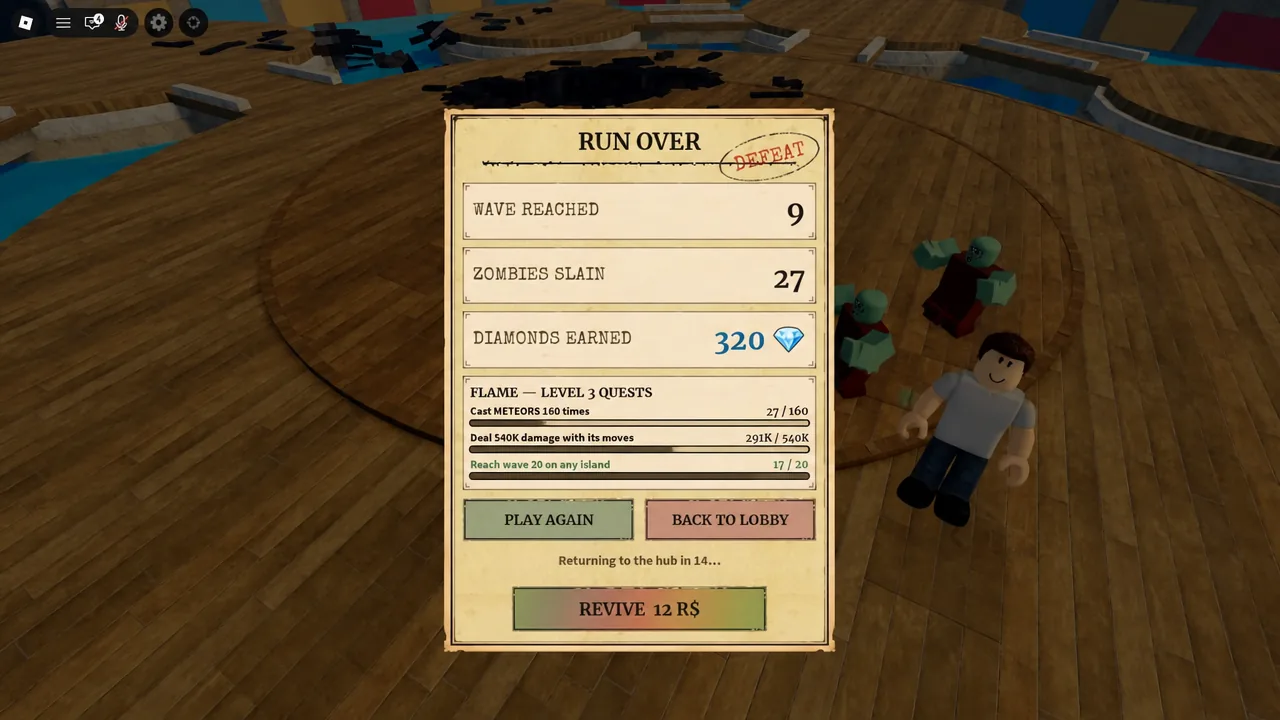
When you reach a completed-run summary, look for the displayed wave, zombie count and Diamonds earned separately. Note which control or choice you still did not understand. Use your next attempt to check that one issue, rather than changing every choice because another guide promises a fixed payout.
Read the combat screen: abilities, upgrades and builds
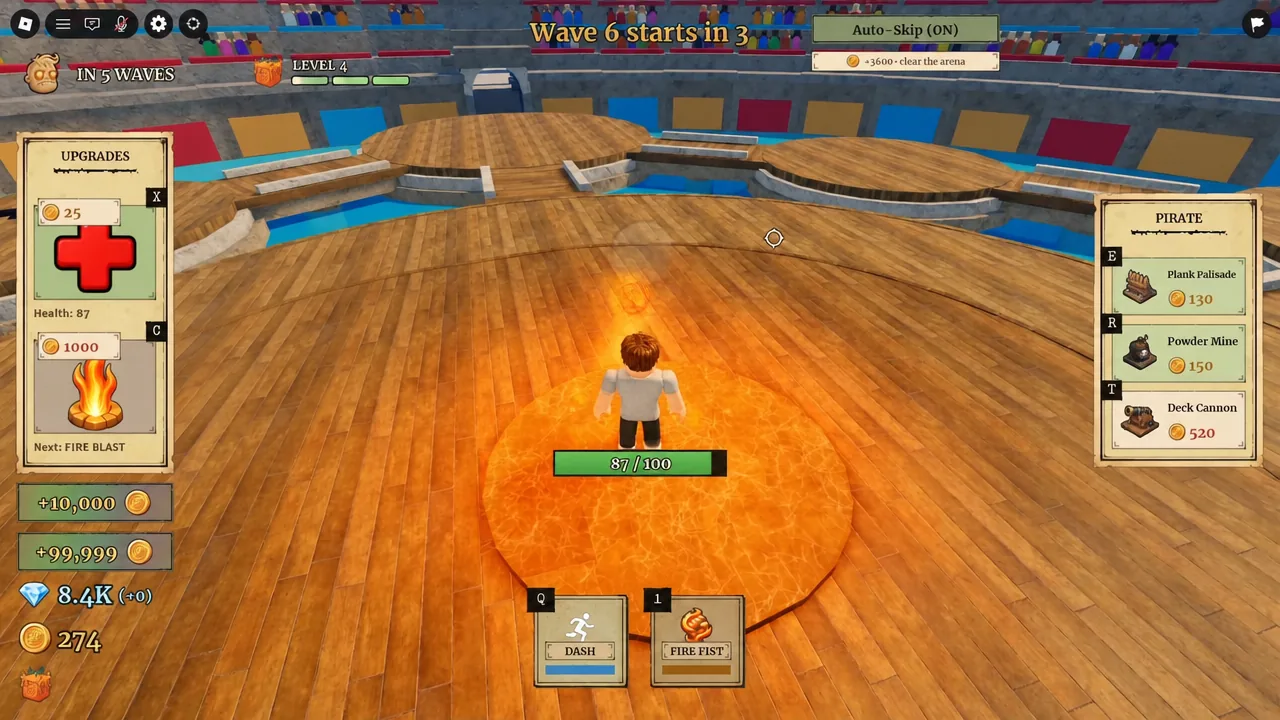
An action you can use, an upgrade you can buy, and a building you can place are different choices. A published desktop screenshot provides a useful example of how to tell them apart.
| Area in the example | Visible labels | What to check |
|---|---|---|
| Bottom action bar | DASH with Q; FIRE FIST with 1 | Match the action you want to use to the binding displayed beside it. |
| Left UPGRADES panel | Health and Next: FIRE BLAST | Read this as an upgrade choice. Do not assume an entry marked Next is already on your action bar. |
| Right PIRATE panel | Plank Palisade, Powder Mine and Deck Cannon | Keep these displayed build choices separate from the fruit actions at the bottom. |
Fire Fist and Fire Blast are different labels in this example
The action bar says FIRE FIST, while the upgrade panel says Next: FIRE BLAST. To identify the shown attack control, start with the action bar rather than the key beside an upgrade card.
This is a reference image from an article updated September 7, 2026. Its capture date and game build are not identified. It does not establish current prices, identical controls on every device, or the effects of an upgrade.
Open the published desktop interface example.
Does Auto-Skip remove every countdown?
Do not read Auto-Skip as a promise of zero waiting. A published desktop screenshot shows Auto-Skip (ON) at the same time as Wave 6 starts in 3....
Read the Auto-Skip status and the wave countdown separately. Seeing a countdown by itself is not enough to conclude that the setting failed or that you need to restart the run.
This example does not establish the current countdown length, multiplayer voting rules or the control layout on every device. It comes from an article updated September 7, 2026; the image's capture date and game build are not identified.
View the published Auto-Skip and countdown example.
Example reviewed: September 13, 2026 (UTC). No in-game test was performed.
When the run ends, read the run result separately from Flame quest progress.
Class and fruit choices: match the role to your run
Your class and your fruit are different choices. The class provides character build options; the fruit provides its own combat abilities. Choosing a damage-focused class is not the same as equipping a particular fruit, and a fruit ability is not a building from your class panel.
Use the role you need as a starting point rather than treating a tier-list position as a purchase instruction. The reviewed guides describe these examples:
| What you need help with | Class to compare | Reported role |
|---|---|---|
| Adding offensive pressure | Enel | Damage-oriented builds and lightning offense. |
| Managing an approaching horde | Aokiji | Ice-based control and defensive obstruction. |
| Adding traps and crowd control | Usopp | Trap and garden-based control tools. |
| Supporting survival and healing | Chopper | Sustain and team support. |
| Protecting important builds | Franky | Barricades and defensive support. |
These are examples of different jobs, not a complete class catalogue or a verified ranking. They do not establish which class will clear the most waves on your account.
Decide what to compare before spending
Think about the problem you are trying to solve: more damage, better control of the horde, healing, or protection for builds. Compare the class descriptions that address that problem. In a group, discuss who is covering each job rather than assuming every player needs the same class.
Check the build description and the purchase cost shown in your current game before committing currency. This guide does not publish verified current class prices, unlock requirements or a universal class-and-fruit combination.
For rewards and currency records, continue to Diamond rewards and quest conditions. Keep a reported code reward separate from the cost of a class.
Sources reviewed for this section: September 15, 2026 (PDT). This is a review of published guides, not an in-game test. The role overview draws on Destructoid's class discussion, All Things How's class guide and GameStratWiki's beginner guide. Their rankings, prices and performance claims are not adopted here as verified facts.
If a guide does not match your screen
Compare the action name as well as the key. Use the prompts displayed by your current device, rather than assuming a guide's keyboard shortcut applies everywhere. A different menu or binding does not establish a level gate or paid-access requirement.
For a reported code, use the redemption steps and code help rather than looking for the field in an upgrade or building panel.
What to do after the first run
Choose one concrete next task. If you did not understand the end screen, read the Diamond reward guide. If you want to try a reported free reward, open Codes and preserve the spelling exactly. If you need to check that you launched the right experience, use the official links. This keeps your next session focused on a question you can resolve without assuming an unverified build is mandatory.
Mistakes to avoid
Treating Berries and Diamonds as the same counter
Read the currency label before comparing an upgrade cost with a run reward.
Following a key from another device
Use the binding displayed beside your current fruit ability or movement action.
Resetting to chase a promised Diamond number
Read your own completed result; no fixed one-minute payout is established here.
Questions & answers
What should I focus on during my first run?
Learn the displayed controls, identify fruit and character-building choices, and read Berries upgrades before selecting them. Review the completed-run result before deciding what to investigate next.
Do I need a particular fruit or paid pass to use this guide?
This checklist does not depend on a named fruit or a paid pass. It does not establish any game-wide unlock or access requirements; follow the current game interface for those.
Is Fire Fist always bound to V?
No universal binding is established here. A published desktop example shows 1 for Fire Fist and Q for Dash. Follow the controls displayed by your current game.
Are Berries the same as Diamonds?
Keep their labels separate. The official description identifies Berries with strengthening the current run, while the published run-summary example labels a separate Diamonds earned result.
Where do I redeem a reported code?
Published guides describe Settings near the upper-left, then the code field and Redeem. See the Codes page for exact strings, reported rewards and the limits of the reported instructions.
Choose your next step
Understand Diamond rewards
Read your run result and compare it with reported code rewards.
Try a reported code
Copy the exact spelling and follow the reported redemption route.
Official game and developer links
Check the experience and open the supporting sources.